
Smart Timetable & Class Scheduling
From scheduling chaos to seamless organization. Create, manage, and share timetables effortlessly. Eliminate conflicts, save hours of planning time, and keep teachers and students informed with our intelligent timetable system.

Timetable Planning Shouldn't Take Days or Cause Conflicts
If any of these challenges sound familiar, we make them disappear with intelligent scheduling automation.
Hours spent manually creating timetables on paper or Excel
Creating timetables manually wastes days every term and leads to errors and conflicts.
Teacher and classroom conflicts that disrupt classes
Double-booking teachers or classrooms causes confusion and wastes valuable teaching time.
Teachers and students don't know their schedules
Paper timetables get lost, and students miss classes because they don't know when or where to be.
Last-minute changes cause confusion and missed classes
When schedules change, there's no easy way to notify everyone, leading to empty classrooms and frustrated teachers.
No visibility into resource utilization and availability
You can't see which classrooms or labs are free, making it hard to optimize resource allocation.
Printing and distributing timetables wastes time and paper
Every term, you print hundreds of timetables that get lost or become outdated quickly.
Meet the Timetable System That Eliminates Scheduling Stress
Our intelligent timetable module was designed for schools that need seamless scheduling, automatic conflict detection, and instant updates — turning days of planning into minutes of smart work.
How It Works
Four simple steps to create and manage perfect timetables.
Set Up Classes & Subjects
Step 1
- •Define your classes, subjects, and teachers
- •Assign teachers to specific subjects and classes
- •Set up periods and time slots for your school day
Generate or Create Timetable
Step 2
- •Use automatic generation to create conflict-free timetables
- •Or manually build timetables with drag-and-drop ease
- •System automatically detects and prevents scheduling conflicts
Review & Adjust
Step 3
- •Review the generated timetable for all classes
- •Make adjustments easily with real-time conflict checking
- •Ensure optimal resource and teacher allocation
Publish & Share Instantly
Step 4
- •Publish timetables with one click
- •Teachers and students access their schedules immediately
- •Automatic notifications when schedules change
Core Features
Benefit-focused features that solve real scheduling problems.
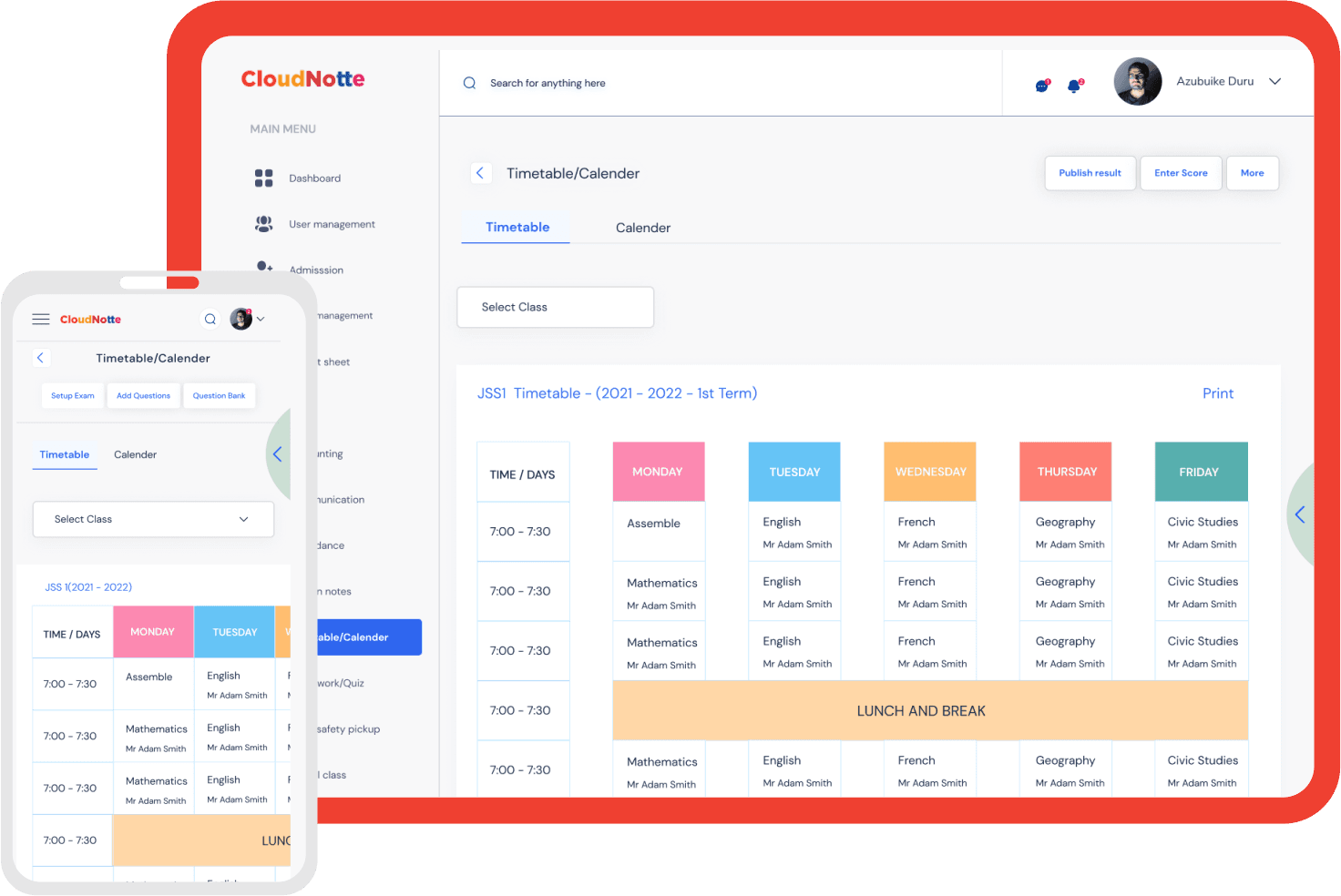
Automatic Conflict Detection
Never double-book teachers or classrooms again
- •System automatically prevents scheduling conflicts
- •Real-time alerts when assigning overlapping periods
- •Ensures optimal teacher and resource utilization
Personalized Timetables
Every teacher and student sees only their schedule
- •Teachers access their personalized timetable instantly
- •Students see their class schedule on any device
- •No more lost or outdated paper timetables

Easy Schedule Management
Create and update timetables in minutes, not days
- •Drag-and-drop interface for easy adjustments
- •Bulk updates for multiple classes at once
- •Copy and adapt timetables from previous terms
Real-Time Updates & Notifications
Keep everyone informed when schedules change
- •Instant notifications to teachers and students
- •Automatic updates across all devices
- •No confusion or missed classes due to outdated schedules
Resource & Classroom Management
Optimize utilization of classrooms, labs, and facilities
- •Track which classrooms and labs are available
- •Assign specific rooms to classes automatically
- •View resource utilization reports and analytics
Print & Export Options
Generate professional timetables for display or records
- •Print timetables for classrooms and notice boards
- •Export to PDF or Excel for record keeping
- •Customizable templates with school branding
Who This Is For
Perfect for institutions that value organization and efficiency in scheduling.

Ebenezer International School, Nigeria
Ebenezer International School transformed their scheduling process with Cloudnotte's Timetable module. They reduced timetable creation time from 3 days to 30 minutes, eliminated all scheduling conflicts, and improved teacher satisfaction by 85%. Students and teachers now access their schedules instantly on any device, and the school has saved over ₦200,000 annually on printing costs.
Frequently Asked Questions
Can the system automatically generate timetables?
Yes! Our intelligent system can automatically generate conflict-free timetables based on your classes, subjects, teachers, and available time slots. You can then review and adjust as needed. This saves hours of manual planning time.How does conflict detection work?
The system automatically checks for conflicts in real-time as you create or edit timetables. It prevents double-booking teachers, classrooms, or labs, and alerts you immediately if a conflict is detected. This ensures every schedule is valid and conflict-free.Can teachers and students access their timetables?
Absolutely! Once timetables are published, teachers can view their personalized schedule showing all their classes, subjects, and time slots. Students can see their class timetable with all subjects and periods. Both can access this on any device, anytime.What happens when I need to make changes to a timetable?
You can easily update timetables at any time. The system will check for conflicts before saving changes. Once updated, all affected teachers and students receive automatic notifications about the changes, ensuring everyone stays informed.Can I copy timetables from previous terms?
Yes! You can duplicate and adapt timetables from previous terms or sessions. This is especially useful for recurring schedules, and you can make adjustments as needed for the new term. This saves significant time compared to creating from scratch.Does it support different period structures?
Definitely. You can customize your school's period structure - whether you have 6 periods, 8 periods, or any other configuration. You can also set different time slots for different days if needed, and define break times.Can I assign specific classrooms or labs to classes?
Yes! You can assign specific classrooms, laboratories, or other facilities to classes. The system tracks resource utilization and ensures no double-booking of facilities. You can also view reports showing which resources are being used and when.Can I print timetables for display?
Absolutely. You can generate professional timetables in PDF format for printing and display in classrooms or notice boards. The system supports customizable templates, and you can include school branding and logos.
Bring your whole institution onto one platform
Schools, colleges and universities can get started today, or book a walkthrough with our team.